
How to Redeem Your Blissful Rewards!
You've worked hard to build up some points! Now it's time to treat yourself! Here's how to do it...
In order to redeem points, first you must be signed in to your account on our website.
Then, you can navigate to the bottom right hand corner on our site and click the red button with your rewards balance to redeem your rewards.
SETP 1: Log In
There are two ways to log in.
You can select Login at the top of the page.
OR
You can can select the red "BLISSFUL REWARDS" button at the bottom right of the page (this shows you info on the Rewards program), then select Login at the bottom of the pop-up.
Enter your email and password you used to create your account.
(NOTE: If you’ve already created an account when you place orders, this is the same login information.)
After you login, it will take you to your Bliss Kiss account.
SETP 2: View your Rewards Information
Click on the red, "Balance: XXX" button on the bottom right of the website to bring up your rewards.
(You’ll see your order history, instructions on how to earn more points, and your rewards.)
SETP 3: Determine your Reward
To see what Reward options are available, click on “My Rewards.”
This will show you the Rewards and the points needed to redeem those rewards. If you have enough points to redeem a reward, it will be shown in Black and you will be able to select that reward. If you don't have enough points for a reward, it will show in Gray and you won't be able to select it.
Do some quick math and figure out which option gives you the best deal for the size order you plan to place.
NOTE: You can only use ONE COUPON CODE per order. If you're ordering during one of our Semi-Annual Sales, do the math to figure out if your rewards points or the 10% off newsletter coupon gives you the best deal.
Redeeming your points will generate a random alphanumeric coupon code which you can enter at checkout.
STEP 4: Redeem points for a Reward Coupon Code
Click on the reward you have available and want to use. It will pop up a screen asking you to confirm or cancel redeeming your points for a coupon code reward.
When you click “confirm” you will get a coupon code that you can use on checkout.
You’ll also get an email from blisskiss@zinrelo.info with the subject line “Here is your reward from Bliss Kiss!” that has your coupon code inside. You may have to search your spam folder in case the email gets filtered.
Your Coupon Code will not expire and will be available to you until you use it toward a purchase on our site.
If you need help or lose your coupon code, please email us and customercare@myblisskiss.com.
Here are Visual Instructions that show how to Redeem Your Points
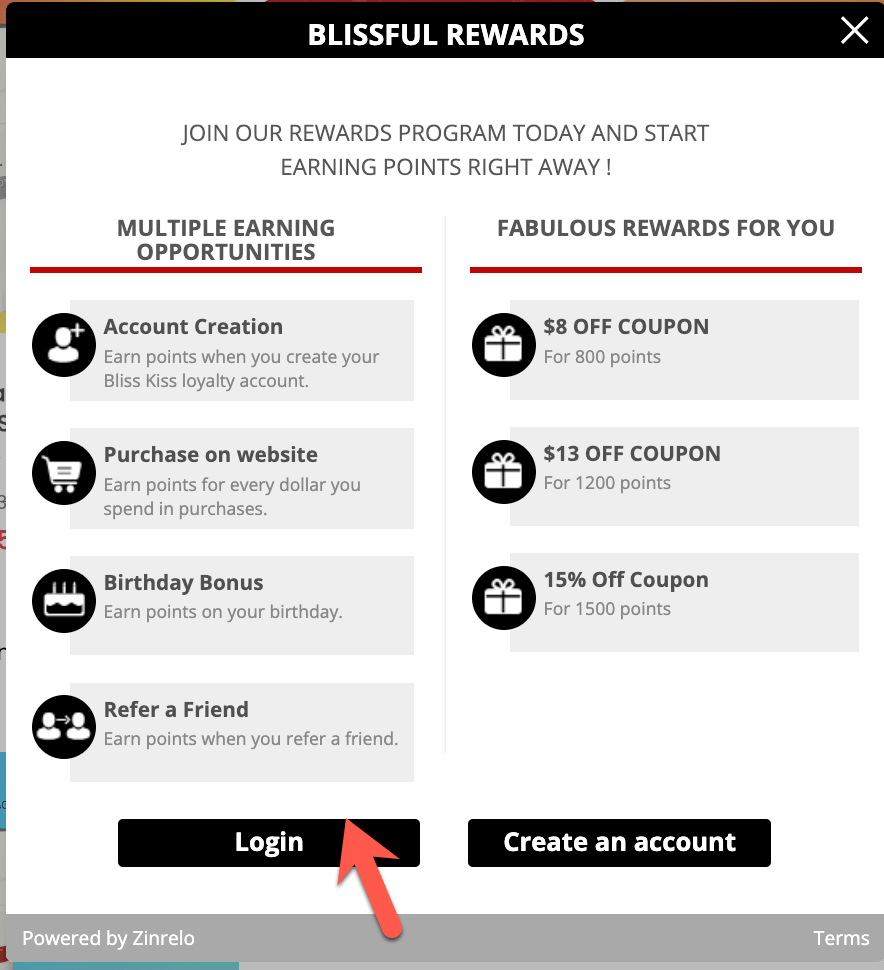
STEP 1:
Click on the Red "Blissful Rewards" Button and then click "Login"
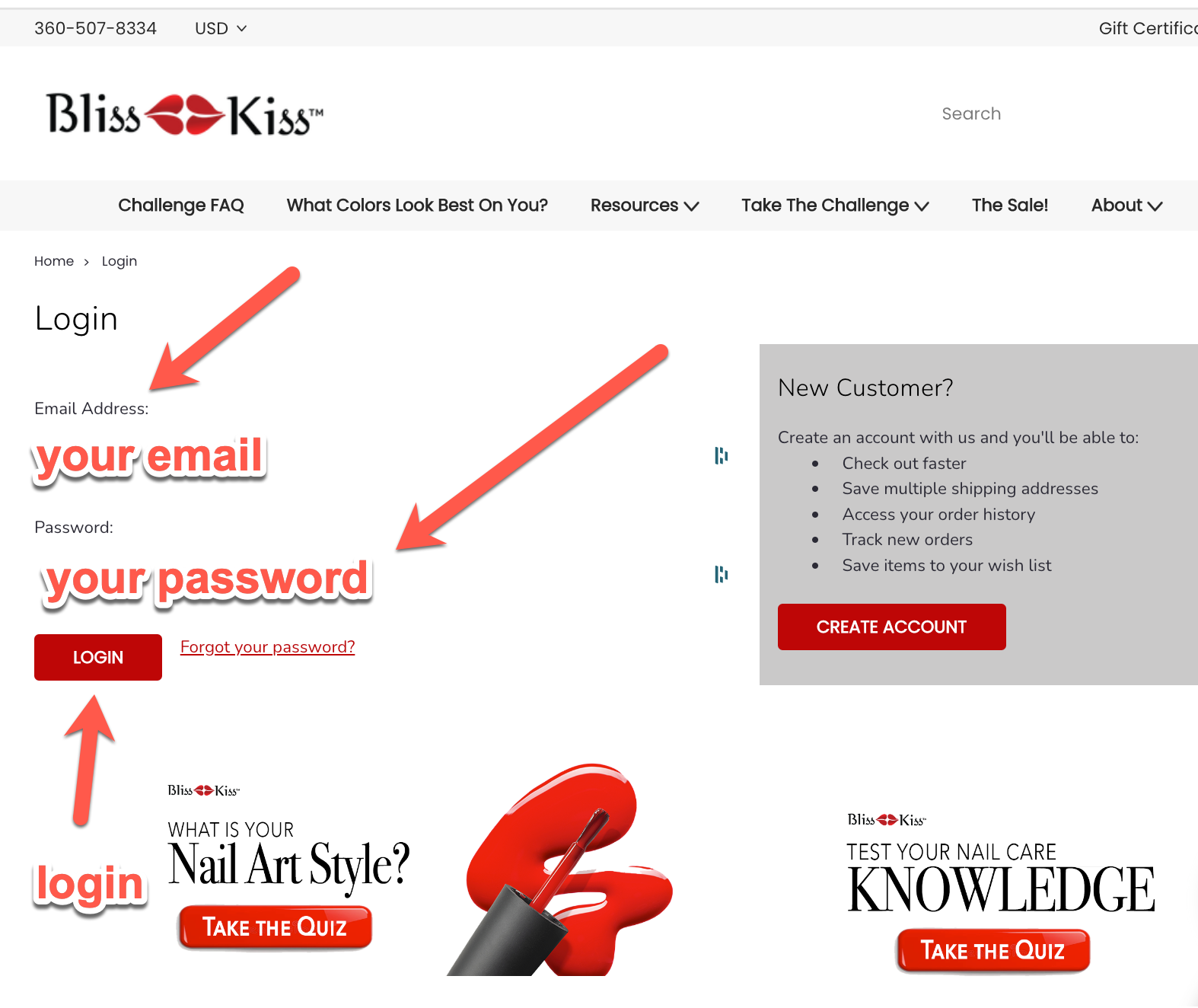
SETP 1 (continued):
This will pop up a window that will allow you to login to your account. Enter your email and password you used to create your account. (NOTE: If you’ve already created an account when you place orders, this is the same login information.)
After you login, it will take you to your Bliss Kiss account.
STEP 2:
Click on the Balance: XXX Button to bring up your rewards. (You’ll see your order history, instructions on how to earn more points, and your rewards.)
To redeem points, click on “My Rewards.”
STEP 3:
To see what Reward options are available, click on “My Rewards.”
This will show you the Rewards and the points needed to redeem those rewards. If you have enough points to redeem a reward, it will be shown in Black and you will be able to select that reward. If you don't have enough points for a reward, it will show in Gray and you won't be able to select it.
Do some quick math and figure out which option gives you the best deal for the size order you plan to place.
NOTE: You can only use ONE COUPON CODE per order. If you're ordering during one of our Semi-Annual Sales, do the math to figure out if your rewards points or the 10% off newsletter coupon gives you the best deal.
STEP 4:
Click on the reward you have available and want to use. It will pop up a screen asking you to confirm or cancel redeeming your points for a coupon code reward.
When you click “confirm” you will get a coupon code that you can use on checkout.
You’ll also get an email from blisskiss@zinrelo.info with the subject line “Here is your reward from Bliss Kiss!” that has your coupon code inside. You may have to search your spam folder in case the email gets filtered.
Apply your coupon at checkout to redeem your savings!
If you need help or lose your coupon code, please email us and customercare@myblisskiss.com.
Blissful Rewards
Welcome to Blissful Rewards
Your loyalty deserves to be celebrated. Every time you shop with us, share your nail care journey, or help a friend discover healthier nails, you're building toward rewards that make your next Bliss Kiss purchase even sweeter.
Why We Created Blissful Rewards
Here's the thing: we're a small, family-owned company, and you—our community—are the reason we get to do what we love. The Blissful Rewards program is our way of saying thank you for being part of this journey. Whether you've been with us since the beginning or just discovered Simply Pure last week, we want to reward the actions that help us grow together.
How It Works
Earning Points is Simple

Make a Purchase — Earn 10 points for every $1 you spend
- Your points add up automatically with each order
- No special codes needed—just shop as usual
Celebrate Your Birthday — Get 200 bonus points
- Make sure your birth date is in your account settings
- We'll drop those points in your account on your special day
Refer a Friend — Earn 300 points
- Share your unique referral link
- You both get rewarded when they make their first purchase
Redeeming Your Points
Once you've collected points, here's how to use them:
800 points = $8 off coupon code
1200 points = $13 off coupon code1500 points = 15% off coupon code
To redeem:
- Login to your Blissful Rewards account and click on the "my rewards" tab
- Select the rewards you want to redeem and click confirm.
- Copy the coupon code that will be generated and paste that code into the coupon code field in your cart. Hit apply.
- If you need to find your coupon code again, you can access it under "reward history" tab.
Checking Your Points Balance
Log into your account and click on "Blissful Rewards" in your account menu. You'll see:
- Your current points balance
- Points history (what you've earned and when)
- Available rewards you can redeem
- Your personal referral link to share with friends
Important Details
Points Expiration — Points remain active as long as you make a purchase at least once every 12 months. We'll send you a reminder email before any points are set to expire.
Points Per Order — Points are earned on your order subtotal (before shipping and taxes). They're credited to your account once your order ships.
Need Help?
We're here for you! If you have questions about your points balance or how the program works, email us. We typically respond within one business day.